

How To Create Pf Status In Sap Abap
When you're used to create buttons in ALV Grid dynamically then you think why SAP doesn't allow create dynamically buttons on GUI STATUS. You can change icon or text if you defined that function has dynamic text but you cannot create buttons at runtime and you always have to create GUI STATUS and GUI TITLE in SE41, which personally I don't like, as in most small reports you have to create usually one to five buttons.
So what I want to present to you today is a way to create buttons dynamically at program runtime without a need to create GUI STATUS and GUI TITLE for each program. In fact whole trick is to create firstly a GUI STATUS in empty program which will contain only functions with dynamic texts, and then to fill properly static class attribute.
So let's begin with creating our program to keep GUI STATUS and GUI TITLE. I will call it ZAB_DYNAMIC_GUI_STATUS. In the source code you do not need to put anything beside report keyword.
"! Dummy program for keeping GUI STATUS and TITLE
"! Used by ZCA_AB_DYNAMIC_GUI
"! Do not delete it!!!
reportzab_dynamic_gui_status.
Yes, that's all from the code point of view in this program. As said it's only to keep GUI STATUS and GUI TITLE.
Lets create GUI STATUS firstly and call it DYNAMIC_STATUS. Items on application toolbar will have the same naming pattern Fxx, so F01, F02 etc. Each of this function code should have dynamic function text with pattern ZCA_AB_DYNAMIC_GUI=>BUTTONS-Fxxwhere Fxx you have to replace by current function code.
Additionally to application toolbar, fill also function keys for save, up, back, exit, print... etc so you can also use it in your programs.


Save & activate GUI STATUS.
Now create also GUI TITLE and call it DYNAMIC_TITLE. As a text put &1 &2 &3 &4 &5. Save & activate.
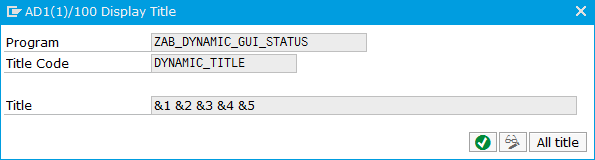
That's all forZAB_DYNAMIC_GUI_STATUS program. Now it's time to create class with static methods to be able to use created STATUS and TITLE everywhere we need.
Class is called ZCA_AB_DYNAMIC_GUI. Once created please make sure that constant program_name contains name of program which stores DYNAMIC_STATUS and DYNAMIC_TITLE.
Definition:
classzca_ab_dynamic_guidefinition
public
create public .
public section .
types : begin oft_buttons,
f01typersfunc_txt,
f02typersfunc_txt,
f03typersfunc_txt,
f04typersfunc_txt,
f05typersfunc_txt,
f06typersfunc_txt,
f07typersfunc_txt,
f08typersfunc_txt,
f09typersfunc_txt,
f10typersfunc_txt,
f11typersfunc_txt,
f12typersfunc_txt,
f13typersfunc_txt,
f14typersfunc_txt,
f15typersfunc_txt,
f16typersfunc_txt,
f17typersfunc_txt,
f18typersfunc_txt,
f19typersfunc_txt,
f20typersfunc_txt,
f21typersfunc_txt,
f22typersfunc_txt,
f23typersfunc_txt,
f24typersfunc_txt,
f25typersfunc_txt,
f26typersfunc_txt,
f27typersfunc_txt,
f28typersfunc_txt,
f29typersfunc_txt,
f30typersfunc_txt,
f31typersfunc_txt,
f32typersfunc_txt,
f33typersfunc_txt,
f34typersfunc_txt,
f35typersfunc_txt,
end oft_buttons.
types : begin oft_allowed_but,
function type sy-ucomm ,
end oft_allowed_but.
types :tt_excluded_buttype standard table ofsy-ucomm.
types :tt_allowed_buttype standard table oft_allowed_but.
constants :b_savetypesy-ucommvalue 'SAVE' ,
b_backtypesy-ucommvalue 'BACK' ,
b_uptypesy-ucommvalue 'UP' ,
b_exittypesy-ucommvalue 'EXIT' ,
b_printtypesy-ucommvalue 'PRINT' ,
b_findtypesy-ucommvalue 'FIND' ,
b_find_nexttypesy-ucommvalue 'FINDNEXT' ,
b_first_pagetypesy-ucommvalue 'PGHOME' ,
b_last_pagetypesy-ucommvalue 'PGEND' ,
b_previous_pagetypesy-ucommvalue 'PGUP' ,
b_next_pagetypesy-ucommvalue 'PGDOWN' ,
b_01typesy-ucommvalue 'F01' ,
b_02typesy-ucommvalue 'F02' ,
b_03typesy-ucommvalue 'F03' ,
b_04typesy-ucommvalue 'F04' ,
b_05typesy-ucommvalue 'F05' ,
b_06typesy-ucommvalue 'F06' ,
b_07typesy-ucommvalue 'F07' ,
b_08typesy-ucommvalue 'F08' ,
b_09typesy-ucommvalue 'F09' ,
b_10typesy-ucommvalue 'F10' ,
b_11typesy-ucommvalue 'F11' ,
b_12typesy-ucommvalue 'F12' ,
b_13typesy-ucommvalue 'F13' ,
b_14typesy-ucommvalue 'F14' ,
b_15typesy-ucommvalue 'F15' ,
b_16typesy-ucommvalue 'F16' ,
b_17typesy-ucommvalue 'F17' ,
b_18typesy-ucommvalue 'F18' ,
b_19typesy-ucommvalue 'F19' ,
b_20typesy-ucommvalue 'F20' ,
b_21typesy-ucommvalue 'F21' ,
b_22typesy-ucommvalue 'F22' ,
b_23typesy-ucommvalue 'F23' ,
b_24typesy-ucommvalue 'F24' ,
b_25typesy-ucommvalue 'F25' ,
b_26typesy-ucommvalue 'F26' ,
b_27typesy-ucommvalue 'F27' ,
b_28typesy-ucommvalue 'F28' ,
b_29typesy-ucommvalue 'F29' ,
b_30typesy-ucommvalue 'F30' ,
b_31typesy-ucommvalue 'F31' ,
b_32typesy-ucommvalue 'F32' ,
b_33typesy-ucommvalue 'F33' ,
b_34typesy-ucommvalue 'F34' ,
b_35typesy-ucommvalue 'F35' ,
program_nametypeprognamevalue 'ZAB_DYNAMIC_GUI_STATUS' .
class-data :allowed_buttonstypett_allowed_but.
class-data :buttonstypet_buttons.
class-data :excluded_buttonstypett_excluded_but.
class-methods :class_constructor.
class-methods :add_buttonimporting value (iv_button) typesy-ucomm
value (iv_text) typesmp_dyntxt- text optional
value (iv_icon) typesmp_dyntxt-icon_idoptional
value (iv_qinfo) typesmp_dyntxt-quickinfooptional
value (iv_allowed) typeabap_booldefaultabap_true
exceptions
button_already_filled
button_does_not_exists
icon_and_text_empty.
class-methods :hide_buttonimporting value (iv_button) typesy-ucomm.
class-methods :show_buttonimporting value (iv_button) typesy-ucomm.
class-methods :get_toolbarexportinge_toolbartypet_buttons.
class-methods :add_separatorimporting value (iv_button) typesy-ucomm.
class-methods :show_titleimporting value (iv_text1) typestring
value (iv_text2) typestringoptional
value (iv_text3) typestringoptional
value (iv_text4) typestringoptional
value (iv_text5) typestringoptional .
class-methods :show_gui_status.
protected section .
private section .
endclass .
Implementation:
classzca_ab_dynamic_guiimplementation .
methodadd_button.
databuttontypesmp_dyntxt.
checkiv_buttonis not initial .
ifiv_textis initial andiv_iconis initial .
raiseicon_and_text_empty.
return .
endif .
button-icon_id=iv_icon.
button-icon_text=iv_text.
button- text =iv_text.
button-quickinfo=iv_qinfo.
assign componentiv_buttonof structurebuttonsto field - symbol (<bt>) .
if<bt>is assigned .
if<bt>is initial .
<bt>=button.
ifiv_allowedeqabap_true.
show_button(iv_button=iv_button) .
endif .
else .
raisebutton_already_filled.
endif .
else .
raisebutton_does_not_exists.
endif .
endmethod .
methodadd_separator.
add_button(
exporting
iv_button=iv_button
iv_text=|{ cl_abap_char_utilities=>minchar }|
* iv_icon = iv_icon
* iv_qinfo = iv_qinfo
iv_allowed=abap_true
exceptions
button_already_filled= 1
button_does_not_exists= 2
icon_and_text_empty= 3
others = 4
) .
ifsy-subrc <>0 .
* message id sy-msgid type sy-msgty number sy-msgno
* with sy-msgv1 sy-msgv2 sy-msgv3 sy-msgv4.
endif .
endmethod .
methodclass_constructor.
excluded_buttons= value#( (b_01) (b_02) (b_03) (b_04) (b_05) (b_06) (b_07) (b_08) (b_09)
(b_10) (b_11) (b_12) (b_13) (b_14) (b_15) (b_16) (b_17) (b_18) (b_19)
(b_20) (b_21) (b_22) (b_23) (b_24) (b_25) (b_26) (b_27) (b_28) (b_29)
(b_30) (b_31) (b_32) (b_33) (b_34) (b_35)
(b_save) (b_find) (b_find_next) (b_first_page) (b_last_page) (b_next_page) (b_previous_page) (b_print) ) .
endmethod .
methodget_toolbar.
e_toolbar=buttons.
endmethod .
methodhide_button.
checkiv_buttonis not initial .
ifline_exists(allowed_buttons[function =iv_button ]) .
deleteallowed_buttonswhere function =iv_button.
appendiv_buttontoexcluded_buttons.
endif .
endmethod .
methodshow_button.
checkiv_buttonis not initial .
if notline_exists(allowed_buttons[function =iv_button ]) .
data (allowed) = valuet_allowed_but( function =iv_button) .
appendallowedtoallowed_buttons.
deleteexcluded_buttonswheretable_lineeqiv_button.
endif .
endmethod .
methodshow_gui_status.
set pf-status 'DYNAMIC_STATUS' excludingexcluded_buttons[]of programprogram_name.
endmethod .
methodshow_title.
set titlebar 'DYNAMIC_TITLE' of programprogram_namewithiv_text1 iv_text2 iv_text3 iv_text4 iv_text5.
endmethod .
endclass .
Once the class is created in dictionary, you can now easily use it in any program to create dynamic STATUS and TITLE. All you need to do is to call in PBO of the screen methods show_gui_status and show_title. To add new button you have to use methods add_button and pass text or icon or both. As I used every possible item to put function code in the GUI STATUS then if you need separator then you can use method add_separator and pass it's place. This method will add in fact a button without any text or description which will just looks like separator.
If you want to allow disabled function keys you have to use method show_button and pass it's name to it.
Example of use ( create screen 0100 which calls PBO and PAI modules ):
reportzab_dynamic_gui_demo.
data :ok_codetypesy-ucomm.
initialization .
"! Add button at position 01
zca_ab_dynamic_gui=>add_button(
exporting
iv_button=zca_ab_dynamic_gui=>b_01
iv_text=|Test|
iv_icon=icon_delete
iv_qinfo=|Delete|
iv_allowed=abap_true
exceptions
button_already_filled= 1
button_does_not_exists= 2
icon_and_text_empty= 3
others = 4
) .
ifsy-subrc <>0 . endif .
"! Add separator ( empty button ) position 02
zca_ab_dynamic_gui=>add_separator(iv_button=zca_ab_dynamic_gui=>b_02) .
"! Add button at position 03
zca_ab_dynamic_gui=>add_button(
exporting
iv_button=zca_ab_dynamic_gui=>b_03
iv_text=|Test 2|
iv_icon=icon_delete
* iv_qinfo = 'Delete'
iv_allowed=abap_true
exceptions
button_already_filled= 1
button_does_not_exists= 2
icon_and_text_empty= 3
others = 4
) .
ifsy-subrc <>0 . endif .
"! Acitvate print button ( in default only BACK, UP , EXIT are active )
zca_ab_dynamic_gui=>show_button(iv_button=zca_ab_dynamic_gui=>b_print) .
call screen 0100 .
modulepbo_0100output .
zca_ab_dynamic_gui=>show_gui_status( ) .
zca_ab_dynamic_gui=>show_title(iv_text1=| Test Title |) .
endmodule .
modulepai_0100input .
caseok_code.
whenzca_ab_dynamic_gui=>b_uporzca_ab_dynamic_gui=>b_backorzca_ab_dynamic_gui=>b_exit.
leave program .
whenzca_ab_dynamic_gui=>b_01.
"! Do some action here
whenzca_ab_dynamic_gui=>b_03.
"! Do some action here
endcase .
endmodule .
The output of this program is as follows.

Isn't this easy?
How To Create Pf Status In Sap Abap
Source: https://abapblog.com/articles/tricks/77-dynamic-gui-status-title
Posted by: dotsonposelver.blogspot.com
0 Response to "How To Create Pf Status In Sap Abap"
Post a Comment